


UEM Migration
Automated migration with EBF Onboarder
Tool for smooth UEM system change

UEM Migration
Tool for smooth UEM system change

The EBF Onboarder is THE tool for successfully changing UEM systems. It ensures that every UEM migration runs smoothly and automatically with minimal effort for IT and users.
Based on all common UEM systems, our UEM migration tool can migrate to Microsoft Intune, Workspace ONE UEM, Ivanti EPMM/Neurons, BlackBerry UEM, Jamf, Google Workspace, and MaaS360. It also supports switching from an on-premises environment to the cloud. With EBF Onboarder, you’ll save at least 50% of your time and countless headaches.
The EBF Onboarder supports migration from various popular UEM systems, including Cisco Meraki, BlackBerry UEM, Sophos Mobile Control, SOTI, XenMobile 9/10, and many more.
EBF Onboarder makes it easy for administrators to change UEM systems.
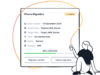
In the first step, administrators prepare the migration on the EBF Onboarder platform: settings, migration waves, target system and device selection, timing, communication.
The EBF Onboarder platform sends automated mailings and/or push notifications with all important information to end users.
Users start the migration independently and at a time of their choosing, completing it with just a few clicks.
Admins can view the current migration progress at any time in a clear dashboard and can generate reports.
We offer 20 free trial migrations so you know exactly what you’re getting into.


We make it as easy and clear as possible for you: EBF Onboarder addresses the sticking points of UEM migration and has already proven itself millions of times over.
This guarantees that implementation will run efficiently.
All of this ensures a high level of commitment among colleagues and reduces the workload on the help desk.
This allows end users to choose the best time for themselves, increasing the participation rate.
Full transparency and control enable targeted support exactly where it’s needed.
With EBF Onboarder, migration is almost effortless: end users hardly have to do anything, and IT administrators are relieved of the burden thanks to automated processes. It’s no wonder that many companies have already relied on our tool and benefited from it.
From medium-sized companies to DAX 30 companies, our customers are represented worldwide and come from a wide variety of industries.

“Without EBF Onboarder for Microsoft Intune, the migration would not have gone so smoothly. Migration costs were reduced by an astonishing 90%, and the migration period was cut from 18 to 6 months.”

“Using the EBF Onboarder migration tool, combined with the in-depth workplace expertise of EBF and Bechtle, we were able to successfully reduce our migration schedule to a minimum. EBF’s support was very competent and fast.”

“In a complex environment—with many different users located in different places and speaking different languages—the multilingual EBF Onboarder is a great solution.”
Yes, you get 20 free licenses to test EBF Onboarder on your own server and get a realistic idea of whether it is the right UEM migration tool for you.
Numerous, EBF Onboarder supports migrations from UEM systems such as VMware Workspace ONE, Ivanti EPMM/Neurons, BlackBerry UEM, Jamf, Microsoft Intune, IBM MaaS360, Cisco Meraki, Citrix XenMobile, Sophos, and Managed Bulk Import. We are continuously expanding the list and are happy to accommodate your requirements. Just contact us.
Yes, you can use EBF Onboarder to migrate Android Enterprise-managed devices (COPE, COBO, COSU, BYOD). For COPE, COBO, COSU: When you start the migration on the device, it will be wiped and restarted in the target UEM. The target UEM system must be configured for Android Zero-touch and Samsung Knox. For BYOD: During MDM migration, the secure container with apps and data is removed. The migration link must be launched in a standard browser on the device outside the container. But don’t worry, we are happy to assist you with any detailed questions – we are here to support you as experts!
The EBF Onboarder does not use Apple DEP, Google Zero-Touch (AZT), or Samsung Knox Enrollment (KME) authentication if the migration does not perform a wipe. If you want to take advantage of the full DEP, AZT, or KME experience, you can use the “Managed Enrollment” target option, which initiates a wipe migration. You can still track the migration status on the dashboard, and users can determine the timing of the migration, but they will lose their data due to the wipe. You can also use the “Enable wipe option for regular migration” option.
For Apple DEP, you can use the EBF Onboarder without resetting to factory settings. In this case, DEP enrollment is not used. The “Supervised” status is retained and the MDM has full functionality afterwards – just like a regular Apple DEP device.
For Android Enterprise-registered devices (COBO, COSU, COPE), a full wipe is always required for an MDM migration.
Yes, the EBF Onboarder can easily migrate DEP and non-DEP devices. However, we recommend using different migration projects to keep track of the UEM migration. For DEP devices, you must ensure that the MDM server in your DEP account points to the new UEM system before the devices are migrated.
With “Managed Enrollment,” the device is completely wiped. All other forms of migration with standard processing functions only affect company data.
No, the EBF Onboarder does not have access to personal data on the devices without the user’s consent.
For performance and clarity reasons, the maximum batch size should not exceed 1,000 devices.
The EBF Onboarder platform is a secure, shared cloud server.
UEM migration takes only a short time, even for large numbers of devices. The exact duration depends on the number of devices, the number of devices migrated simultaneously, your network capacity, the location of your devices, and the availability and resources of your source MDM server. Once we know your circumstances and requirements, we can give you an accurate estimate. The UEM migration of a single device takes between 3 and 10 minutes. The exact time also depends on the factors mentioned above.
Let’s discuss how we can support your team and get your modern workplace to its best.