





WELL CONNECTED ON THE GO
Professional contact management with EBF Contacts
All contacts always available – on the go and even offline.

WELL CONNECTED ON THE GO
All contacts always available – on the go and even offline.

Thanks to EBF Contacts, your team can access professional contacts easily, securely, and even offline while on the go—on iOS, iPadOS, and Android. Automatically synchronized from sources such as Exchange O365/On-Premise or your CRM system. The Global Address List (GAL) or other address books can be easily connected, giving you real-time access to all your contacts. EBF Contacts can even be accessed with Siri, CarPlay, and other devices.
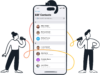
Guessing numbers is a thing of the past, no more frustration with outdated contact data or synchronization problems, and no more undiscovered spam calls.
You can download our modern work tool for easy contact management as a demo version from the app stores.

satisfied users
in the app stores
spam calls exposed

“EBF, our IT service provider, stands out for its high level of expertise and has been a reliable partner for years. Thanks to our long-standing collaboration, we are in the fortunate position of being able to submit product requests to EBF—two new features are currently being tested in Q&A, which, among other things, will enable contacts without email addresses to be deleted. We are eagerly awaiting these developments and look forward to the extended use of EBF Contacts.”
Of course, whether it’s the GAL from O365 or Exchange On-Premise together with your customer contacts from HubSpot and other contacts from a ZIP file (CSV/JSON format) – multiple sources and formats can be fed into EBF Contacts.
Yes, EBF Contacts can interact with various unified endpoint management systems. These include Ivanti EPMM, Microsoft Intune, Workspace ONE, Jamf, and BlackBerry Enterprise Server.
Yes, the app also runs on tablets. On Android tablets, caller ID even works if the device offers full telephony capabilities.
EBF Contacts is the perfect addition to your global address list, allowing you to distribute it (and other contact data sources) to all Android phones and iPhones. This ensures that the contact list on company phones is always up to date and available for telephony and email applications.
If EBF Contacts runs on a UEM system and a work profile is stored on Android, the contact data cannot be read by other apps if configured accordingly.
No, logging in with Kerberos has not yet been implemented.
Yes, contacts stored in EBF Contacts can be accessed via the Teams app, and audio or video calls can be initiated directly from the EBF Contacts app if Teams is set up in the company.
EBF Contacts enables mobile and secure contact management by providing direct access to Microsoft’s Global Address List – both from Microsoft 365 and Exchange On-Premises. This gives employees all relevant company contacts centrally on their mobile device – including caller ID and automatic synchronization. This simplifies communication, increases availability, and ensures consistent contact management even when on the go.
To sync corporate contacts from a company directory to employees’ mobile devices, the Global Address List (GAL) both from Microsoft 365 and Exchange On-Premises or other address books need to be connected. To do so an app like EBF Contacts is needed which supports Microsoft 365, Exchange On-Premises, HubSpot, and CSV sources in one pipeline. The app enables reliable contact delivery across mobile fleets, including caller ID and automatic synchronization. This simplifies communication, increases availability, and ensures consistent contact management even when on the go.
Yes. Enterprise contact synchronization can combine Microsoft 365, Exchange On-Premises, HubSpot, and CSV in one managed architecture. A unified connector model lets IT apply one transformation across all sources, so contact quality and access controls stay consistent. This is especially important when organizations run hybrid infrastructure and multiple business systems in parallel and can be realized with EBF Contacts.
Update speed depends on connector design, policy settings, and device connectivity, but enterprise-grade contact sync should support frequent, automated refresh cycles. The key requirement is predictable propagation with monitoring and retry logic, not manual uploads. In production, teams should track sync latency, failed updates, and stale-record rate as operational KPIs to maintain data quality across iOS and Android fleets.
Yes. Corporate contacts can be delivered by AD group so users only receive relevant data. Scope-based policies reduce exposure risk, improve search relevance, and keep device address books manageable. This model is essential in multinational organizations where legal entities and regional teams require different contact visibility. EBF Contacts allows you to filter through O365 contact data for specific AD groups.
Enterprise contact synchronization is GDPR-compliant and secure, if the implementation applies data minimization, purpose limitation, encryption in transit and at rest, access controls, and auditable processing. For enterprise environments, align policy with legal, security, and workplace teams before rollout to ensure compliance and operational consistency. EBF Contacts fully meets GDPR and security requirements.
Enterprise contact sync can work with Microsoft Intune, Jamf, Workspace ONE, BlackBerry and Ivanti when integration is designed around each platform’s managed app and profile controls. The practical goal is consistent contact delivery and caller identification across iOS and Android regardless of UEM stack. EBF Contacts interacts with various Unified Endpoint Management systems, including Microsoft Intune, Jamf, Workspace ONE, BlackBerry Enterprise Server, and Ivanti EPMM.
For contact management identification, it is important that phone numbers are stored in international format.
Caller identification can continue to work offline when corporate contacts are securely stored on the device and updated during sync windows. This is important for mobile users in low-connectivity environments. Implementations should encrypt local data and define refresh policies so offline usability does not weaken enterprise security requirements. EBF Contacts allows data to be available securely for caller identification without an online connection.
Yes. In managed environments, policy controls can restrict synced business contacts from personal apps and unmanaged profiles. This separation helps prevent accidental data leakage while still giving employees fast access to approved corporate contacts. If EBF Contacts runs on a UEM system and a work profile is stored on Android, the contact data cannot be read by other apps if configured accordingly.
Download the EBF Contacts flyer with all important information now.

Let’s discuss how we can support your team and get your modern workplace to its best.


You are currently viewing a placeholder content from Hubspot Embedded Content. To access the actual content, click the button below. Please note that doing so will share data with third-party providers.
More InformationYou are currently viewing a placeholder content from HubSpot. To access the actual content, click the button below. Please note that doing so will share data with third-party providers.
More InformationYou are currently viewing a placeholder content from Hubspot Meetings. To access the actual content, click the button below. Please note that doing so will share data with third-party providers.
More Information